

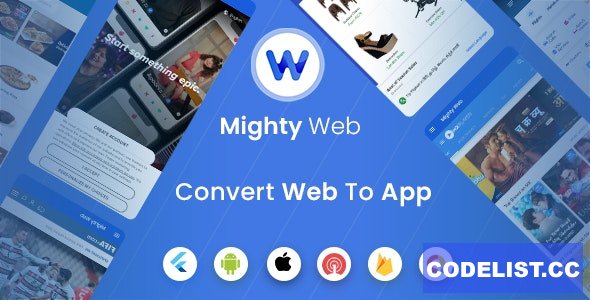
MightyWeb app is used to convert your Web Site to Application Mobile. With backend admin panel, you can setup your app configuration without updating your app.
In this blog I’ll walk you through what MightyWeb is, why it matters today, how it works, where it shines (and where it doesn’t), and how you could use it if you’re in India (especially in smaller cities like yours in West Bengal).
MightyWeb is essentially a “web-to-app” converter:
You have a website (responsive).
You want to launch a mobile app version (so users on Android/iOS can download and use).
Instead of building everything from scratch, you use MightyWeb’s Flutter code + admin backend to wrap your website in a mobile shell and configure settings via the admin panel. docs.meetmighty.com+1
The admin panel allows you to configure many app behaviours without touching the mobile code each time. docs.meetmighty.com
In short: turn a website into an app, quickly.
Here are some of the major reasons this tool can be valuable:
Time & cost savings: Instead of hiring separate mobile devs for Android + iOS + backend, you can leverage a ready-made system.
One codebase (Flutter): Since it's built using Flutter, much of the mobile logic is shared across platforms.
Control via admin panel: You can change app settings, navigation style, update URL endpoints, enable/disable features — without pushing a full new app build.
Leverage existing website assets: If you already have a website (say an eStore, blog, directory), converting to an app with this kind of tool makes sense.
Modern expectations: Users expect mobile apps; having one adds credibility and engagement in many markets.
According to the documentation, here are some of the standout features of MightyWeb:
Supports any website as the base webview. docs.meetmighty.com+1
Multi-language support & RTL (right-to-left) support. WeaDown+1
Dark mode / light mode theming, multiple navigation styles (drawer, bottom nav, tabs). docs.meetmighty.com
Ad integration (AdMob), push notifications (via OneSignal), in-app messaging. docs.meetmighty.com
Advanced options: GPS support, WebRTC (for live communications), full screen, customizable splash screens. docs.meetmighty.com
Admin panel features: Change base URL, configure logo, set menu items, manage splash / walkthrough screens, user-agent settings etc. docs.meetmighty.com
Since you’re in Medinīpur, West Bengal, here’s how you might think about using MightyWeb locally:
Suppose you run a local business (e.g., a directory of pet-care services, or a local food delivery site) and you already have a website. Converting to a mobile app makes sense because:
Many users are mobile-first.
Having an app can increase engagement (push notifications, native feel).
It differentiates you from competitors who are only web-based.
Local payments: The base tool might not include Indian payment gateway integrations (UPI, Razorpay, etc.) out-of-the-box — you’ll likely need to customise.
Local language: You’ll want Bengali + English support; check how easily the multi-language features can be extended.
Connectivity / mobile behaviour: In smaller towns like Medinīpur, internet speeds and device types vary — test how your converted app behaves on lower-spec devices and slower connections.
App store submission: If you target Android (Google Play) or iOS (App Store), make sure your app respects store guidelines (especially if you wrap web content).
Website quality: Since this is a web-view approach, the underlying website must be responsive and mobile-friendly.
Here’s how you might proceed if you decide to use MightyWeb:
Purchase the MightyWeb package from CodeCanyon. CodeCanyon
Prepare your website: ensure it’s responsive, mobile-friendly, and all core functions work in web view.
Set up the admin backend (PHP or whatever backend included) on your server. Configure the base URL, app logo, navigation style. docs.meetmighty.com
Open the Flutter project, update relevant settings: application ID, icons, splash screen, theme colours, URLs.
Build the app for Android & iOS via Flutter.
Integrate payment gateways / local features as needed (for Indian market).
Upload to Google Play / Apple App Store. Promote your app to your users in West Bengal.
Monitor usage, push notifications, analytics; iterate based on user feedback.
Rapid deployment of mobile app from existing website.
Good feature set (push notifications, ad integration, theming).
Single codebase for Android + iOS thanks to Flutter.
Admin panel gives non-technical control over many settings.
Because it’s based on a website wrapped in a web-view, the “native app” feel may be limited compared to a fully native build.
Customising deeper features (offline mode, heavy native UI) might require additional dev work.
If your website is not mobile-optimised, it will show in the app too (since it’s essentially a web-view).
Support & updates depend on the vendor; you’ll need to check version compatibility (Flutter versions, OS versions).
For Indian market, you’ll likely need to do extra adaptation (payment gateways, localisation) which may add cost.
If you find yourself saying: “I already have a website, I want an app version with minimal additional cost/time” — then MightyWeb is a strong option. It gives you a practical bridge from website → mobile app without starting from zero.
However, if your business demands heavy native UX (animations, offline capabilities, complex native modules), or you’re aiming for a large-scale user base where performance is critical, you might eventually outgrow a simple web-view wrapper and may need a fully custom mobile build.
In your context (West Bengal, Medinīpur), launching a branded mobile app — even a web-view one — could give you a distinct edge locally. If you go this route, focus on: local payment integration, language support (Bengali/English), and marketing to mobile-first audiences.
Demo: https://codecanyon.net/item/mightyweb-flutter-for-web-to-app-convertor-admin-panel/31705226